ELRS Binding — Quick Troubleshooting Guide
When this applies: Your ExpressLRS (ELRS) receiver won't bind to your transmitter, or the receiver LED doesn't match what you expect after powering on.
Step 1: Check the LED pattern
The receiver LED tells you exactly what state it's in. Match yours against this table:
| LED pattern | Meaning | What to do |
|---|---|---|
 | Solid on — connected to transmitter (or bootloader mode) | This is good — the receiver is bound and connected |
 | Double blink, then pause — binding mode active | Receiver is ready to accept a bind — go to Step 3 |
 | Slow blink (500ms on/off) — waiting for connection | Normal powered state — needs binding or the TX is off/out of range |
 | Triple blink, then pause — model mismatch | Connected to the TX but model-match settings don't agree — see the model mismatch fix in Step 4 |
 | Medium blink (100ms on/off) — radio chip not detected | Hardware fault — the receiver's radio chip may be damaged. Contact us |
 | Fast blink (25ms on/off) — WiFi mode enabled | Normal — used for firmware updates via the web UI (see Step 2) |
Note: receivers with RGB LEDs use different colours for the same states (e.g. orange double-blink = binding mode). Full RGB table: ExpressLRS Wiki — LED Status.
Source: ExpressLRS Wiki — LED Status (https://www.expresslrs.org/quick-start/led-status/)
Step 2: Check firmware compatibility
This is the single most common cause of binding failures. The major version number (the first digit) must match between your TX module and your receiver. If the major versions don't match, none of the binding methods below will work.
- TX on 3.1.2 + RX on 3.0.1 = ✅ works (both major version 3)
- TX on 4.1.0 + RX on 3.3.0 = ❌ will not bind (major 4 vs 3)
- TX on 3.2.0 + RX on 2.4.0 = ❌ will not bind (major 3 vs 2)
SPI receivers (built into AIO flight controllers): on official Betaflight 4.3.1 and older, SPI receivers only bind with ELRS 2.x; on Betaflight 4.4.0 and newer, only with ELRS 3.x.
How to check your versions:
- Transmitter: open the ExpressLRS Lua script — the version is shown on screen.
- Receiver: power it up and wait for the fast WiFi blink (or hold the boot button to force WiFi mode), then connect your phone/laptop to the ExpressLRS RX WiFi network (password: expresslrs) and open http://10.0.0.1 — the version is shown on the web UI.
If the major versions don't match, update whichever device is on the older major version using the ExpressLRS Configurator. Current firmware release: v4.1.0 (July 2026) — check GitHub releases for the latest.
Source: ExpressLRS Wiki — Binding (https://www.expresslrs.org/quick-start/binding/) and Web UI guide (https://www.expresslrs.org/quick-start/webui/)
Step 3: Bind using one of these methods
If firmware is compatible and the receiver LED is slow-blinking (not yet bound), pick a method:
Method A: Binding Phrase (recommended)
If you're flashing or updating firmware anyway, set a Binding Phrase in the ExpressLRS Configurator before flashing:
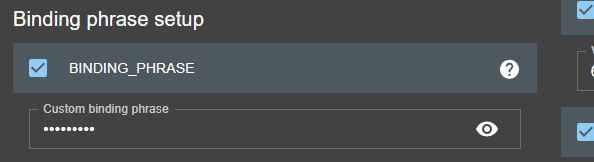
Enter the same phrase (at least 8 alphanumeric characters — your pilot handle works well; it's anti-collision, not a password) on both the TX module and receiver, and they will bind automatically on power-up. On devices running ELRS 3.0 or newer you can also set or change the phrase later via the WiFi web UI (see Step 2 for how to connect).
Method B: Traditional 3x power cycle
- Power off your transmitter/radio.
- Power-cycle the receiver 3 times: power on, the LED lights up, power off within 2 seconds, then repeat twice more.
- The LED should now double-blink then pause — that's binding mode.
- Power on your radio and press [BIND] in the ExpressLRS Lua script:
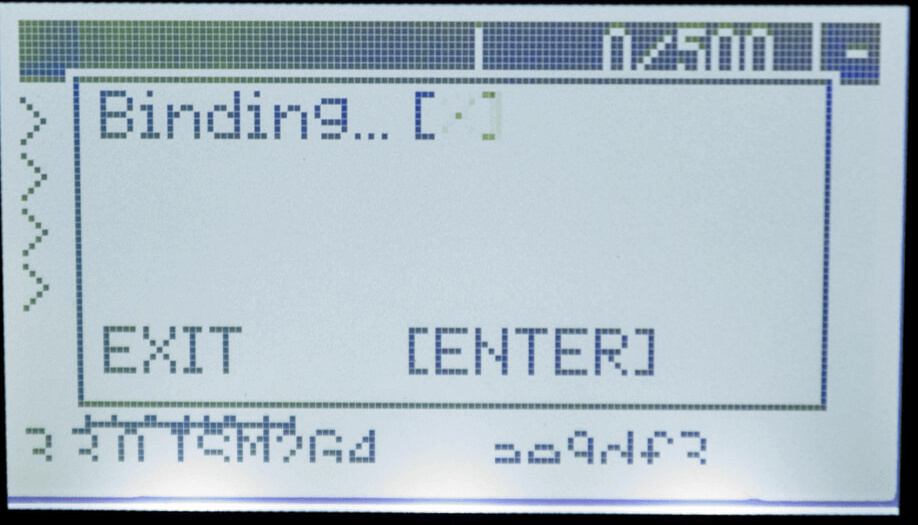
If the LED turns solid, you're bound.
⚠️ Caution: power-cycling is best done with a LiPo flight pack, so make sure your wiring is correct and check for shorts first — you don't want to let out the magic smoke.
Receivers flashed with a Binding Phrase (pre-3.4.0) will not enter traditional bind mode no matter how many times you power-cycle — reflash without the phrase, or use Method A. On ELRS 3.4.0 and newer this restriction is lifted: any receiver can be put into bind mode.
Method C: Betaflight Configurator (ELRS 3.4.0+ and Betaflight 4.5.0+)
In Betaflight Configurator 10.10 or newer, use the Bind Receiver button in the Receiver tab (the bind_rx CLI command also works).
Method D: Button press / boot pad (ELRS 3.4.0+)
Hold the button on the receiver for 1.5 seconds, or short the Boot pad to Ground. The LED will double-blink (binding mode) — then press [BIND] in the Lua script.
A bind persists until another binding procedure is started. To cancel bind mode, reboot the receiver — it keeps its previous bind. (A Lua/WebUI "volatile bind" option wipes the bind on every power-cycle if you ever want that behaviour.)
Source: ExpressLRS Wiki — Binding (https://www.expresslrs.org/quick-start/binding/)
Step 4: Verify the connection
Using the ExpressLRS Lua script (SYS key → Tools → ExpressLRS):
- A "C" in the top-right corner means the TX module and receiver are connected and communicating:
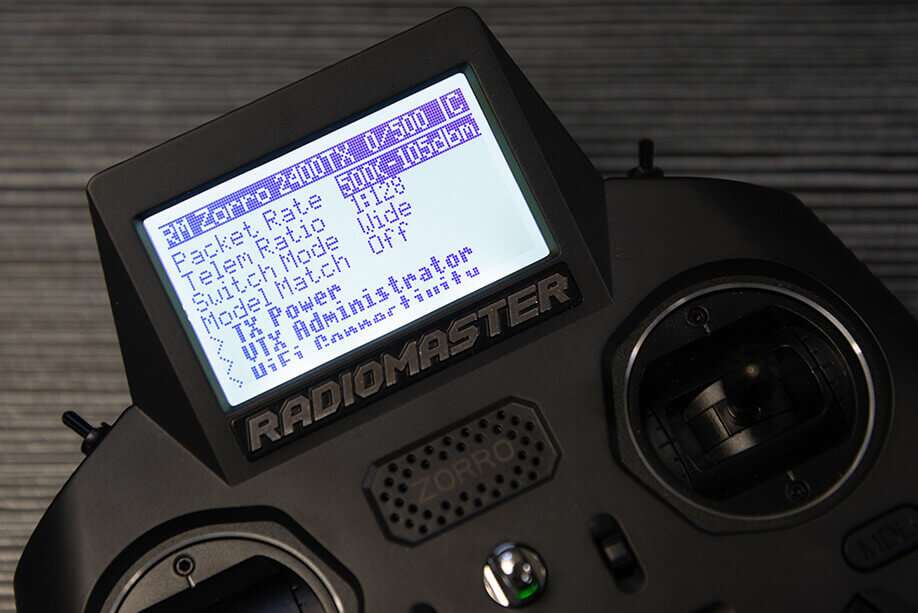
- Anything else (e.g. "T" for telemetry only) means the bind didn't complete — repeat Step 3.
Model mismatch (triple-blink LED or "Model Mismatch" line in Lua): with both devices powered and connected, open the Lua script and set Model Match to Off. If you deliberately use model matching, toggle it Off then back to On to assign the current model/receiver ID.
Source: ExpressLRS Wiki — Binding, Connection Check (https://www.expresslrs.org/quick-start/binding/)
Step 5: Betaflight settings (bound, but no stick response)
If the TX and RX are bound (solid LED, "C" in the Lua script) but the flight controller doesn't respond:
- Ports tab: confirm the UART the receiver is wired to has Serial RX enabled.
- Receiver tab: set Receiver Mode to Serial (via UART) and Serial Receiver Provider to CRSF.
- Wiring: the receiver's TX pad goes to the FC's RX pad, and the receiver's RX pad goes to the FC's TX pad (they cross over).
- Move the sticks — channels should respond in the Receiver tab.
Receiver LED doesn't blink at all
If the LED is solid or off straight after power-up, the receiver may be stuck in bootloader mode. Check, in order:
- The boot button isn't being pressed or pinched (heatshrink can press it) — or the button is damaged.
- If it has a Boot pad instead of a button, make sure the pad isn't shorted to Ground.
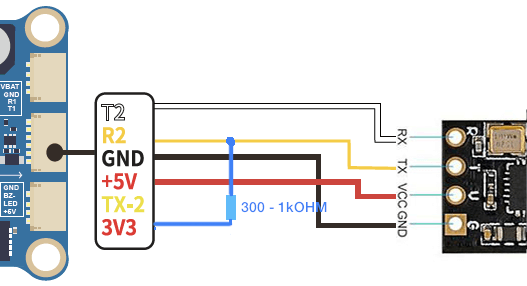
- Disconnect the receiver's RX/TX wires from the flight controller, re-power, and watch the LED. If it now slow-blinks, move the receiver to a different UART. If no full UART is free, a pull-up resistor (300Ω–1kΩ) between the FC's RX pad and 5V or 3.3V can help:
- On digital FPV systems (DJI Air Unit, Caddx Vista, DJI O3) with all six wires connected, remove the SBUS/DJI HDL wire.
Source: ExpressLRS Wiki — Binding, "Receiver LED doesn't Blink" (https://www.expresslrs.org/quick-start/binding/)
Still stuck?
Contact us with the following and we'll take it from there:
- Your TX module model and firmware version
- Your receiver model and firmware version
- Which LED pattern you're seeing (a short video helps)
- Your flight controller and firmware (e.g. Betaflight version)
Images: ExpressLRS wiki (expresslrs.org). Article verified against the ExpressLRS wiki and GitHub releases, July 2026.